

You can perform a bulk update in SAP to add or update existing data in the system.
Imagine we've performed a data migration of approximately 75,000 materials and realized that the migration didn't generate a common piece of data for all of them, and we want to include it for each material. SAP offers a solution for this.
SAP has tools to perform bulk updates on existing data in the system.
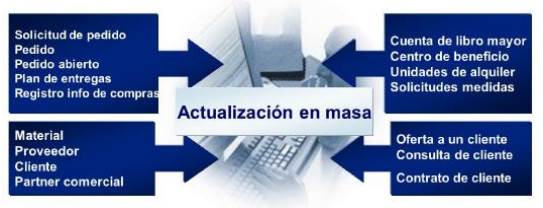
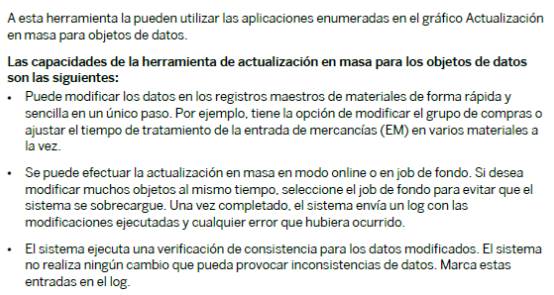
Mass update processes require knowledge of the database tables that will be modified in SAP. Please note the following text regarding this aspect:
One of the options offered by SAP is the mass update of materials in SAP through the MASS transaction.
The mass update in SAP It is a very useful tool for managing mass processes, such as modifying master data, purchase orders, sales orders, contracts, etc. This function allows for efficient and rapid bulk changes.
To manage the mass update, you can follow these basic steps:
- Select the “Manage mass update in SAP” tile” at the SAP Fiori Launch Pad.
- Enter the filter criteria to show the processes you want to update.
- Create, run, or delete processes in bulk. according to your needs.
- Make the necessary modifications in the selected records.
- Verify the validity of the processed data and select the settings for activation.
- The process ends and save the changes
This is best understood with an example:
Example: Mass update of materials in SAP
- Access the MASS transaction:
- Enter MASS in the command bar and press Enter.
- Select the Object:
- On the MASS transaction main screen, select the object you want to update. For this example, we will select “Material” (object BUS1001).
- Define the Filter Criteria:
- Filter the materials you want to update. For example, you can filter by a range of material numbers or by a specific group of materials. Enter the filter criteria and press Enter.

- Select the fields to modify:
- On the next screen, select the fields you want to update. For example, if you want to update the Material Group, select it from the list.
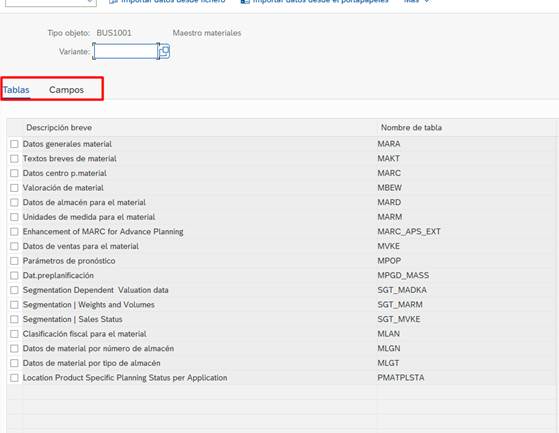
- Introduce the New Values:
- Enter the new values for the selected fields. For example, change the item group to a new value.
- Run the Update:
- Review the changes you've made and, if everything is correct, run the update. Make sure the "Change Log" option is selected so you can review the updates made.
- Check the Update Log:
- Verify that the update was performed correctly by checking the change log.
It's always recommended to test in a development environment before implementing updates in the production environment to avoid potential errors. Once everything is verified to be OK, then implement the update in production.
In conclusion, bulk updates in SAP are a key solution when an organization needs to correct or complete large volumes of master data following processes such as a migration. Tools like the transaction MASS or the options available in SAP Fiori They allow thousands of records to be modified quickly, in a controlled and efficient manner, avoiding manual work that is impossible to undertake in real-world scenarios.
These types of processes not only save time but also ensure data consistency, which is essential for proper business management. However, since they involve direct changes to critical data, it is crucial to have technical expertise, carefully validate the affected fields, and always conduct preliminary tests in development environments before implementing the changes in production.
In short, mass updating is like a "preventive ctrl+z" but done right: a powerful, necessary, and highly recommended tool when used responsibly.
Discover our SAP training
Find out everything on our blog and train in SAP with our Sap S/4Hana Finance Official Certificate.